Made for the session.
And the next one.
A closer look at Logbook for iPhone: the details that help you log your training, understand your progress and stay connected.
On Android or desktop? Explore Logbook on the web ↗
What you get, line by line.
From the first set to your session history, these are the tools in the iPhone app. Team programming lives in the connected coaching product.
- 01
Fast workout logging
Pick up where you left off with previous sets, quick entry, and session details that stay out of your way.
- 02
Exercise-level progress
See best sets, session counts, workout volume, and trends without building your own spreadsheet.
- 03
Your clubs, your way
Train with the people you actually lift with, invite-only or public, and see the sessions they choose to share, newest first.
- 04
Every set, in one place
Review exact sets, muscle focus, shared PRs, and history from the same place you log.
- 05
See your consistency
Track streaks, active days, and session history alongside your training.
- 06
Works with no signal
The iPhone app supports local workout logging when a connection is unavailable. Reconnect to sync saved work; check its save status before closing or changing devices.
- 07
Reusable templates
Save what works, repeat sessions quickly, and spend less time rebuilding familiar workouts.
- 08
Runs, walks and rides too
Record a run, walk, ride or sport session with GPS route, splits and elevation, or pull one in from Apple Health. It lands in the same history as your lifting.
- 09
Coach your team
Logbook Coach on the web lets volleyball and basketball coaches prepare weeks, assign sessions and review submitted work that athletes choose to share.
- 10
Strength-first, not cardio-first
The logging screen is shaped around sets, reps and volume rather than borrowed from a running app. Cardio is recorded properly; it just isn't what the interface is optimised for.
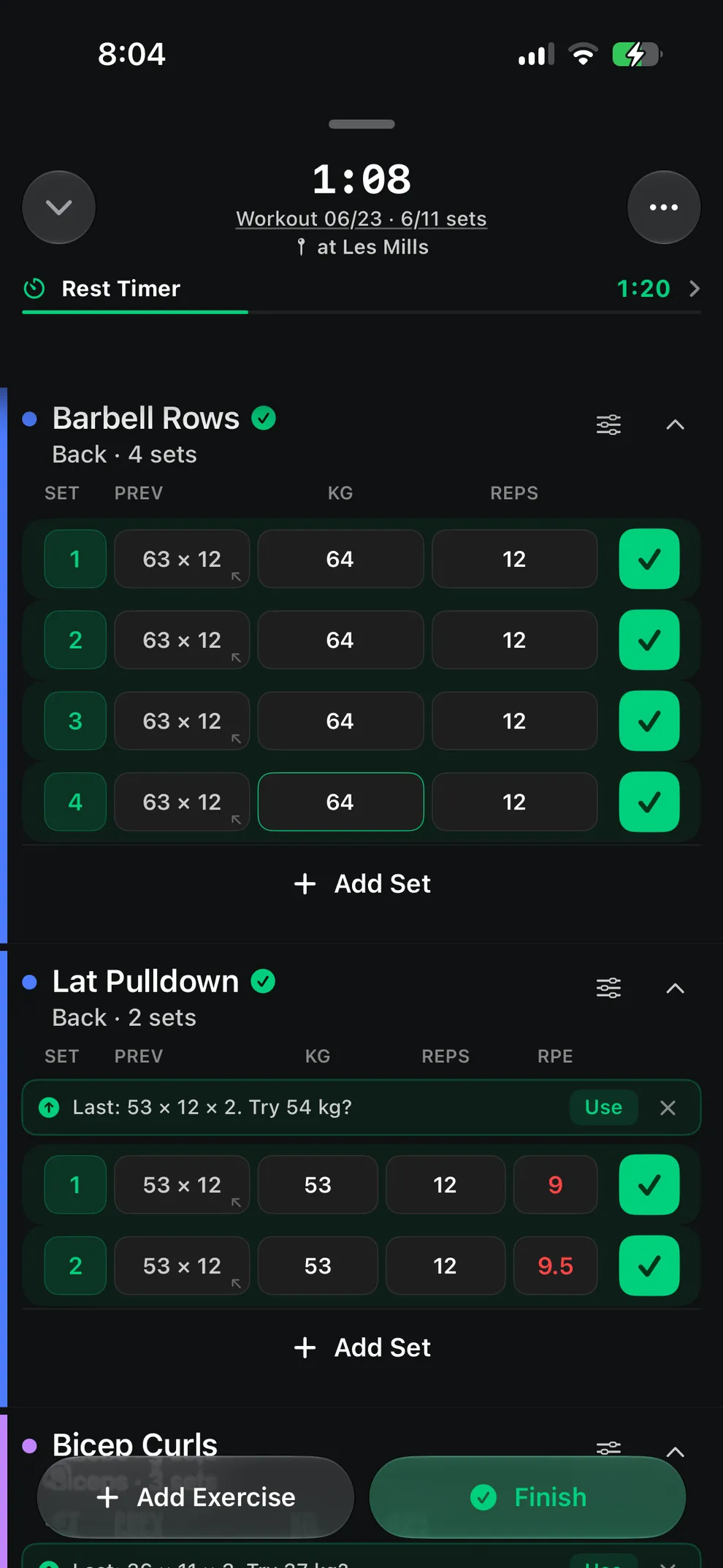
Keep your focus on the session.
Previous-set autofill, a plate calculator, supersets and drop sets, and a keyboard built for lifters. Keep the last set in view, record the next one and start your rest timer.

Progress that lives on the lift.
Best set, estimated 1RM, volume, sessions, and the muscles each movement trains. All on the exercise itself, where the next decision actually gets made. No separate dashboard to dig through.
The questions that come up most.
- What does the iPhone app focus on?
- The iPhone app brings workout logging, previous sets, exercise history, personal records and reusable templates together. Clubs add optional workout sharing and conversation. These are iPhone features; the web app has a separate, growing feature set.
- Can Logbook track running and other cardio?
- Yes. Logbook records runs, walks, rides and sport sessions, with GPS route, splits and elevation when you allow location access. Activities can also be imported from Apple Health, so a workout recorded on your Watch or in another app lands in the same history as your lifting. Each activity has its own privacy setting: private, a club, followers, or public.
- Can a coach run a team in Logbook?
- Logbook Coach is a connected web product for volleyball and basketball teams. Coaches prepare private training weeks, choose athletes and publish assigned sessions. Review shows submitted sessions and results athletes consent to share. A submission is not proof that every prescribed set was performed. Detailed iPhone coaching-report parity is still being verified.
- Does Logbook have a rest timer?
- Yes. The rest timer runs from inside the workout and shows on the lock screen via Live Activities. You can set per-exercise defaults or override per set.
- Does Logbook support supersets and drop sets?
- Yes. Both supersets and drop sets are first-class in the set entry flow. You can also mark warmup, cooldown, and failure sets per set.
- Does Logbook sync with Apple Watch?
- Not in version 1.0. A watchOS app is built but is not part of the 1.0 App Store release, so version 1.0 is iPhone only. Live Activities do ship, so the rest timer and session status appear on your lock screen while you train.
- Can Logbook calculate plate loading?
- Yes. The plate calculator shows the loading on each side of the bar (total weight, bar weight, and plates per side) for a standard 20 kg bar and plate set.
- Does Logbook track PRs automatically?
- Yes. Personal records are detected as you log and surfaced directly on the exercise. No separate dashboard. PR types tracked: estimated 1RM, 3-rep max, 5-rep max, and session volume.
Your next session.
Your next page.
Log your sets, look back on your progress and share the sessions you choose. Your personal training journal starts with you.